Routing visualizer
See which experts every token is sent to, layer by layer: whether the experts specialize (e.g. one per language or script), and whether a router has collapsed onto one expert.
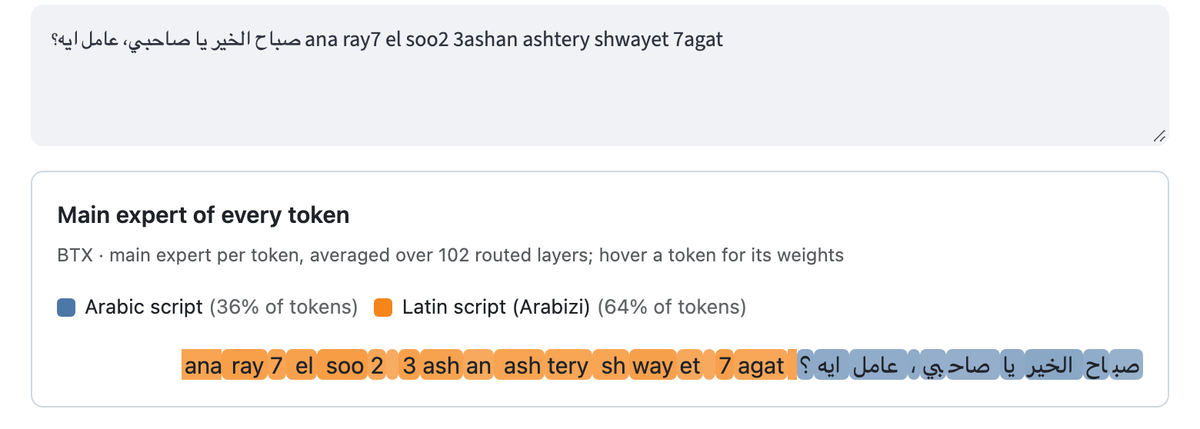
An example: a BTX MoE of the Nile 4B Arabic-script and Latin-script experts, built for this illustration, with its routers trained briefly (250 steps) on Egyptian chat in both scripts.
The app
pip install "mixturekit[vis]"
mixturekit visualize models_merge/gemmax                 # a local merged model
mixturekit visualize my-org/my-moe                       # or the Hub id of a model built with MixtureKit
It runs on CUDA, Apple silicon (MPS) or CPU (--device to choose) and shows:
Section |
What it tells you |
|---|---|
Main expert of every token |
Each token coloured by its main expert, averaged over the layers; hover a token for its weights |
Expert weights per token |
The weight of every expert for every token, in % |
Load of every expert per layer |
The mean weight of each expert in each layer: a layer where one expert takes everything has collapsed routing |
Pick layers in the sidebar to see their routing alone. The MIXTUREKIT_MODEL environment
variable, when set, chooses the model and locks it: visitors cannot load another one.
As a Hugging Face Space
Share the visualizer of your model with a public demo:
Create a Space with the Docker SDK (CPU basic is enough for models up to a few billion parameters).
Upload the files of
space/to it.In the Space settings, add the variable
MIXTUREKIT_MODELwith the Hub id of your merged model (and the secretHF_TOKENif the model is private).
The model is fixed by the variable because a merged model runs its own modeling code
(trust_remote_code): only show models you trust.
An HTML view
mixturekit visualize models_merge/gemmax --text "Bonjour ! صباح الخير" --html routing.html
prints the share of the tokens of every expert and writes a self-contained page you can share.
In Python or a notebook
from MixtureKit.routing import load_model, trace_routing

model, tokenizer = load_model("models_merge/gemmax")
trace = trace_routing(model, tokenizer, "Bonjour ! صباح الخير")
trace                      # displayed inline in Jupyter and Colab
trace.dominant_experts()   # the main expert of every token
trace.expert_share()       # the share of the tokens of every expert
trace.layer_load()         # (layers, experts) mean weights
trace.layers               # layer -> (tokens, experts) weights
What is shown for each method
BTX: every routed projection has its own router (e.g.
layer 3 · mlp.up_proj).Traditional: one router per layer (
layer 3 · mlp).BTS: there is no router; the weights are the share of every stream (the hub and the experts) in the hub at the stitch layers that merge the experts into the hub: the size of each stream’s gated contribution relative to the others.
Routers are created when a model is built and trained afterwards: an untrained model shows random routing, different at every load.